


BFF: Make Friends & Meet Up
4.5840.00 Reviews
App Specs
- Version
- 3.1.29.5253
- Updated On
- License
- Free
- Downloads
- 500,000+
- Developer
- Geneva Technologies, Inc
- Categories
- Lifestyle
- Platform
- Android
Screenshots
 Analysis by AppCompare
I once knew someone who moved to a new neighborhood and found that the hardest part wasn’t locating cafés or parks; it was turning a familiar face into an actual friend. That’s the kind of gap BFF: Make Friends tries to help with. It gives people a way to discover potential friends, start a conversation, and look for shared interests without needing to walk into a room full of strangers. I see it as a useful starting point, not a shortcut to instant closeness: the app can introduce people, but building trust and making plans still takes time and effort.
A better fit for making plans than collecting matches
The most useful way to approach a friendship app is to decide what you hope to do with it before you start browsing. If I were new in town, for example, I’d look for people who enjoy a particular activity I’d genuinely be willing to do, rather than swiping broadly just to see who responds. A specific shared interest gives an opening for a real plan and makes it easier to tell whether a conversation has somewhere to go.
That distinction matters because a long list of possible connections can feel productive while leaving you no closer to having company. I’d treat a promising match as an invitation to exchange a few messages and see whether the other person is interested in a low-pressure activity, not as proof that a friendship is already forming. If the conversation stays vague, it’s reasonable to move on without treating that as a personal failure.
How it fits into a shared household
For someone living with a partner, roommates, or relatives, BFF: Make Friends can be one person’s tool for finding their own community while the household keeps its usual rhythm. A newcomer to a city might use a group or a match to find a walking companion; a roommate could be looking for people who share a hobby without expecting everyone at home to join in. The value is personal connection, not a replacement for household plans or a shared social calendar.
I wouldn’t treat it as a family account or a way to coordinate everyone’s friendships. The practical boundary is simple: each person who wants to use it should manage their own profile and conversations, rather than passing one account around. That keeps introductions, messages, and expectations tied to the person actually making the connection. If someone else in the home wants to try the app, it makes more sense for them to decide for themselves than to have another household member browse on their behalf.
Small choices that can make the first chat easier
The opening message is often the point where a promising connection either becomes more natural or stalls. I’d refer to something specific in the other person’s profile or to the interest that brought us together, then ask one easy question. That works better than a broad greeting because it gives the other person something concrete to answer, while still leaving room for the conversation to develop in either direction.
There’s also a useful trade-off between matching one-to-one and looking for a group. A direct match can feel more personal, but it puts more pressure on two people to carry a conversation. A group can make it easier to join around an activity and observe the tone before investing in a particular connection, though it may take longer to find a person you click with. I’d choose based on whether I wanted a focused conversation or a wider, activity-based way into a local community.
Worth Reading Before You Choose

EA SPORTS FC Mobile 26 Is a Bigger Football Game, but It Takes Time

Flipboard Shows What News Apps Must Do Beyond the Feed

Switching to Android Auto Means Rethinking Your Driving Routine

Google Calendar Makes a Crowded Week Easier to Manage

Ludo King Makes the Most of the Minutes Between Plans

Baby Panda World Brings Quick Play to Modern Phones, but Its Game Library Feels Busy
For an everyday example, imagine finishing work in an unfamiliar city on a free evening. Instead of scrolling through profiles with no plan, I might look for a local interest that fits the time I have, send a short message, and suggest a simple public activity if the exchange feels comfortable. If no one is available or the conversation doesn’t click, I’d keep the evening plan flexible rather than relying on an app match to rescue it. That approach makes the app a useful option without letting it dictate the day.
Getting Started with BFF: Make Friends
First things first, setting up BFF: Make Friends is a breeze. The app is available on both Android and iOS, so no matter your device, you can jump right in. Once downloaded, you'll be guided through a quick registration process. It’s pretty straightforward—just link it up with your existing Bumble account, or create a new one if you’re new to the Bumble ecosystem.
The app interface is refreshingly intuitive. It’s all about simplicity here, which is a big win in my book. You’re greeted with a clean and organized layout, making it easy to navigate through various features without feeling overwhelmed. Trust me, you won’t need a manual to figure this one out!
Features That Stand Out
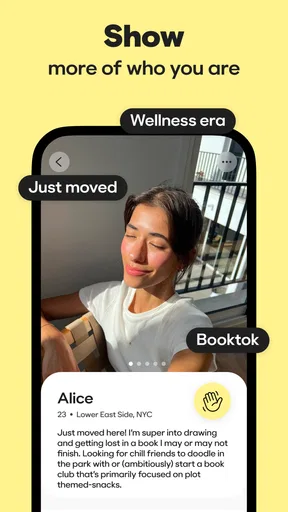
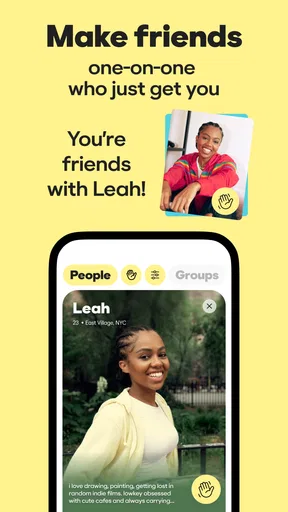
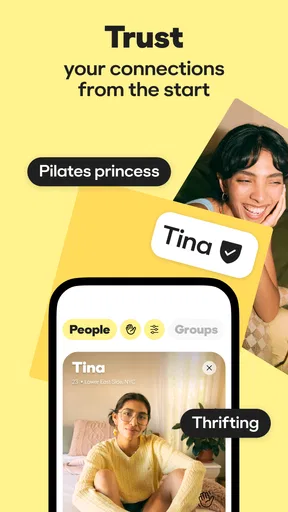
The primary feature of the app is its friendship matching system. Much like the dating version of Bumble, you swipe right to connect with potential friends. The app uses your interests, location, and profile info to suggest matches, making it feel personalized and relevant.
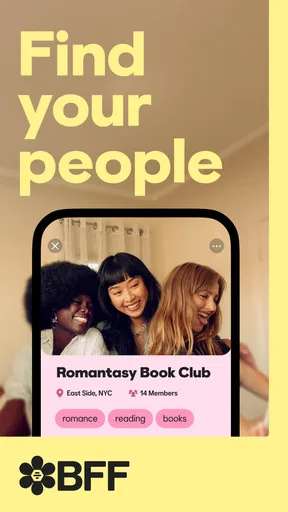
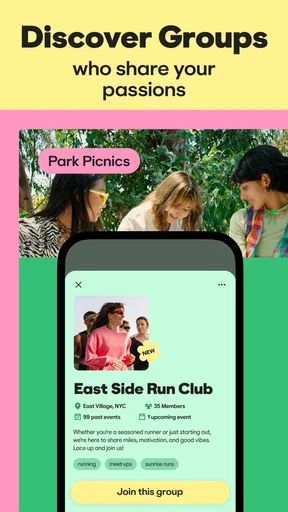
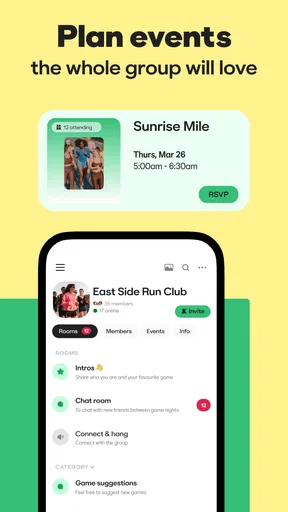
One unique aspect is the ability to join interest-based groups. Whether you’re into hiking, cooking, or even knitting, there’s likely a group for you. This feature is fantastic because it not only matches you with individuals but also connects you with entire communities. It’s like joining a club without leaving your couch!
Another cool feature is the icebreakers provided by the app. Not everyone is great at starting conversations, and these prompts are designed to help you break the ice without the awkwardness. It's a small touch, but incredibly helpful for those first few interactions.
Choosing the right way to connect
I’d use the different paths in the app with a little intention rather than treating them as interchangeable. If I already know the kind of person I want to meet, profile-based matching gives me a direct place to start. If I’m more interested in finding a regular activity or testing out a new hobby, an interest group may offer a more natural conversation starter. The best choice depends on what I can realistically follow through on, not simply which option produces the most notifications.
One practical tip is to make a profile useful for conversation. A short, specific mention of an activity you enjoy gives someone a better opening than a string of broad interests. I’d also be honest about whether I’m looking for a one-off activity companion or hoping to build an ongoing friendship. Clear expectations make it easier for both people to decide whether the connection fits.
Who’s It For?
Honestly, BFF: Make Friends seems perfect for anyone looking to expand their social horizons. Whether you’ve moved to a new city, want to meet people with similar hobbies, or just fancy chatting with someone new, this app has got you covered.
It’s also great for introverts who might find traditional social settings a bit daunting. The app allows you to connect at your own pace, giving you the confidence to engage when you’re ready. It's like having the social experience without the social anxiety.
Where BFF differs from familiar alternatives
Compared with meeting people through work, classes, or existing friends, an app makes the first introduction more deliberate: you can search around friendship and shared interests instead of hoping a suitable connection appears in your daily routine. That can be a real advantage after a move or when your usual circle doesn’t share a particular hobby. On the other hand, an in-person class or local club already gives people a recurring activity to talk about, so it may be a better choice if you prefer friendships to grow through seeing the same people over time.
General social networks are useful for keeping up with people you already know, but I wouldn’t expect them to do the same job as a space focused on meeting new friends. BFF gives a clearer route to an introduction; existing networks can feel more familiar and may make it easier to find mutual contacts. Neither approach guarantees a lasting connection. I’d choose the app when I want to actively meet someone new and choose an offline group when shared routine matters more than browsing profiles.
Boundaries, age, and trust
The app is free and is rated for Everyone, but that age label shouldn’t be confused with a promise that every interaction will suit every household member. I’d consider who is using it, what they’re comfortable sharing, and whether they understand that an online match is still a stranger. The safest, most grounded approach is to keep personal details limited at first, take time to judge the conversation, and choose a public setting if deciding to meet in person.
For parents or guardians thinking about a shared device, I would not assume that the age rating means the app is designed for children or that it includes family supervision tools. It is a social app for forming connections, so the adult responsible for a device should discuss boundaries directly rather than rely on the rating to make that decision. In a shared home, notifications and conversations are personal; keeping accounts separate and respecting each person’s privacy is a better habit than treating the screen as communal.
Trust also takes more than a polished profile or a shared hobby. I’d pay attention to whether someone respects a slow pace, answers straightforward questions, and accepts a no without pushing. If anything feels off, there is no need to continue just because the app made the introduction. That judgment applies whether I’m chatting one-to-one or joining a group, and it is part of using any social platform thoughtfully.
Potential Pitfalls
That said, no app is without its quirks. One thing to keep in mind is that, like any social app, success hinges on user activity. The experience can vary depending on how many active users are in your area. In less populated regions, you might find fewer matches, which can be a bit of a bummer.
Another point worth mentioning is the potential for ghosting. While the app does its best to connect you with like-minded people, not everyone is committed to maintaining conversations. It’s part of the online social game, but still something to be aware of.
What to expect before making it a habit
A friendship app works best when I give it a little time without turning it into a daily obligation. I’d check in when I have a genuine reason to meet people, then spend my energy on a couple of conversations that seem promising instead of treating every match as a task. If the local pool is quiet, I’d widen my approach by considering different interests or use offline activities alongside the app rather than repeatedly refreshing and feeling discouraged.
It also helps to decide what counts as progress. A pleasant exchange, a shared group conversation, or a plan that actually happens can all be worthwhile steps, even if none immediately becomes a close friendship. If I need reliable company for a household commitment or a time-sensitive plan, I wouldn’t depend on a new match to fill that role. The app is better for opening possibilities than guaranteeing attendance.
Geneva Technologies, Inc develops the lifestyle app, which is free to use. It has an average rating of 4.3 from around 2.5 thousand ratings, with over 100 thousand installs and 761 written reviews. The current version is 3.1.17.5076, and it was released on January 20, 2022. Those figures suggest a reasonably established option, but they don’t tell me whether the local community near you is active, so I’d judge its usefulness by the conversations and groups available in your area.
Final Thoughts
All in all, BFF: Make Friends by Bumble is a solid option for anyone looking to make genuine connections. It’s user-friendly, fun, and packed with features that encourage social interaction. While it’s not without its hiccups, the potential to meet interesting people and form meaningful friendships makes it worth a try.
Whether you’re a seasoned social butterfly or just dipping your toes into the friend-making waters, this app offers a modern solution to an age-old need. Give it a download, swipe a few profiles, and who knows? You might just find your next best friend!
My household verdict
For a household, I’d recommend BFF as an individual tool for an adult who wants to widen their own social circle, not as a shared account or a substitute for family coordination. Its mix of one-to-one discovery, groups, and conversation prompts gives different personalities a few ways to get started, while still asking users to make their own choices about who to trust and how to meet. If you prefer friendships to develop only through familiar, recurring in-person settings, a club or class may suit you better. If you’re open to an online introduction and patient about turning it into a real connection, I think it’s worth trying.
Pros
- User-friendly interface
- easy to navigate.
- Connects with people nearby and worldwide.
- Robust privacy settings for user safety.
- Diverse community for varied interactions.
- Seamless integration with social media.
Cons
- Requires constant internet connection.
- Limited features in free version.
- Occasional bugs in chat feature.
- In-app ads can be intrusive.
- Profile setup can be time-consuming.
FAQs for BFF: Make Friends & Meet Up
What is BFF: Make Friends by Bumble and how does it work?
BFF: Make Friends by Bumble is a platform designed to help users find and connect with new friends in their area. Similar to dating apps, it uses a swipe-based interface where users can match with others based on shared interests and hobbies. The app focuses solely on friendship, allowing users to build meaningful connections in a safe and welcoming environment.
Is BFF: Make Friends by Bumble free to use?
Yes, BFF: Make Friends by Bumble is free to download and use. However, like many apps, it offers premium features through Bumble Boost or Bumble Premium. These paid options provide additional functionalities, such as seeing who liked you, extending matches, and more, enhancing the overall user experience.
How does BFF: Make Friends ensure user safety and privacy?
BFF: Make Friends by Bumble prioritizes user safety and privacy through several measures. It verifies profiles using photo verification, employs robust reporting and blocking features, and encourages respectful interactions. Additionally, it requires mutual interest for connections, ensuring that users only interact with those they feel comfortable with.
Can I switch between Bumble’s dating and BFF modes easily?
Yes, Bumble allows users to toggle between its different modes—dating, BFF, and Bizz (for professional networking)—with ease. This flexibility enables users to explore different types of connections without needing separate accounts, making it convenient to switch based on their current social needs.
What kind of information should I include in my BFF profile to find the best matches?
To enhance your chances of finding compatible matches on BFF: Make Friends, it’s important to create a detailed and engaging profile. Include information about your interests, hobbies, and what you’re looking for in a friend. Adding a few photos and a brief bio can also help others get a better sense of your personality, making it easier to connect with like-minded individuals.


